Introduction to Divisions
Introduction to Divisions. Divisions let one Wheelhouse site run several parts of your business separately. Each division has its own orders, production, purchasing, and inventory, while sharing the…
Introduction to Divisions
Divisions let one Wheelhouse site run several parts of your business separately. Each division has its own orders, production, purchasing, and inventory, while sharing the setup that should stay common, such as your product lines and your report definitions.
Why you would use it
If you run more than one plant, brand, or operating company, you usually want two things at once: people should see their own work without wading through everybody else's, and the business should still behave as one company where that matters. Divisions give you that split.
If you operate as a single business, you do not need to turn divisions on, and nothing about your day changes.
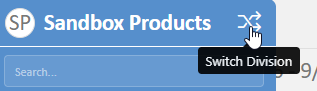
Choosing your division
Your current division is shown in the top bar, and you change it from the switcher in the left menu. Switching changes what you see across the application, including the record search, which returns results from the division you are in.
What belongs to a division, and what is shared
Two kinds of record:
Division records belong to exactly one division. Orders, order lines, work orders, purchases, and quality records all work this way. They are always the property of one division.
Shared records can either belong to a division or be available to all of them. Product lines, configurators, form and object templates, organizations, availability, and reports work this way. Left unassigned, they are shared by every division, which is usually what you want for setup that should not be duplicated.
Orders and production across divisions
One division can sell another division's product, and a single order can contain items made by different divisions. That is a normal thing to do, not an error.
When an order becomes a job:
- The job belongs to the division of the order it came from.
- Each work order belongs to the division that makes that item.
So if a Division A order contains only an item made by Division B, the job stays with Division A and the work order goes to Division B. Division A's Job Manager will not show it, because the board shows work orders and Division A has no work to do on that order. Nothing has gone missing.
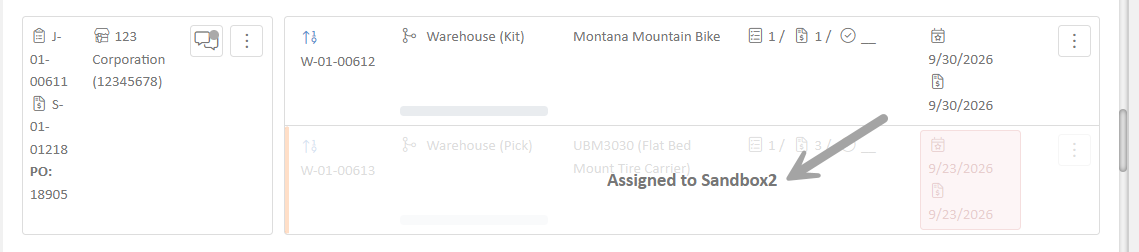
When an order does span divisions, the Job Manager shows the whole job and greys out the part that belongs to another division, and it tells you which division that part is assigned to.
Where one division's work has to reach another before it ships, job routing handles the movement, and work orders can be merged across divisions so the parts ship together.
Reports
Reports are not filtered by division automatically. This is deliberate, because sooner or later somebody needs a report that compares divisions, and a report that silently hid data would be worse than one that shows everything.
The consequence is that whoever builds a report decides what it covers. If a report should be limited to the current division, add the division filter when you build it. This is the same principle that applies to reports shared with people outside your company: the report definition is what controls the data, so build it deliberately.
People outside your company
Contacts and outside representatives are not tied to a single division, by design. They see across divisions rather than being locked to one. Keep this in mind when you decide what to share with them, and see the note on reports above.
How did we do?